Novabuilder logo

Free Infographic & Data Visualization Tools

Transform your data into stunning visual content with our collection of 13 free online tools. Create charts, graphs, comparisons, country infographics, mobile comparisons, and more in minutesโ€”no design skills required!

โœจ 100% Free Forever ๐ŸŽจ Fully Customizable ๐Ÿ“ฅ Export as PNG ๐Ÿš€ No Sign-Up โšก Instant Results
13
Free Tools
50+
Design Themes
200+
Countries Supported
โˆž
Unlimited Exports

Country & Geographic Comparisons

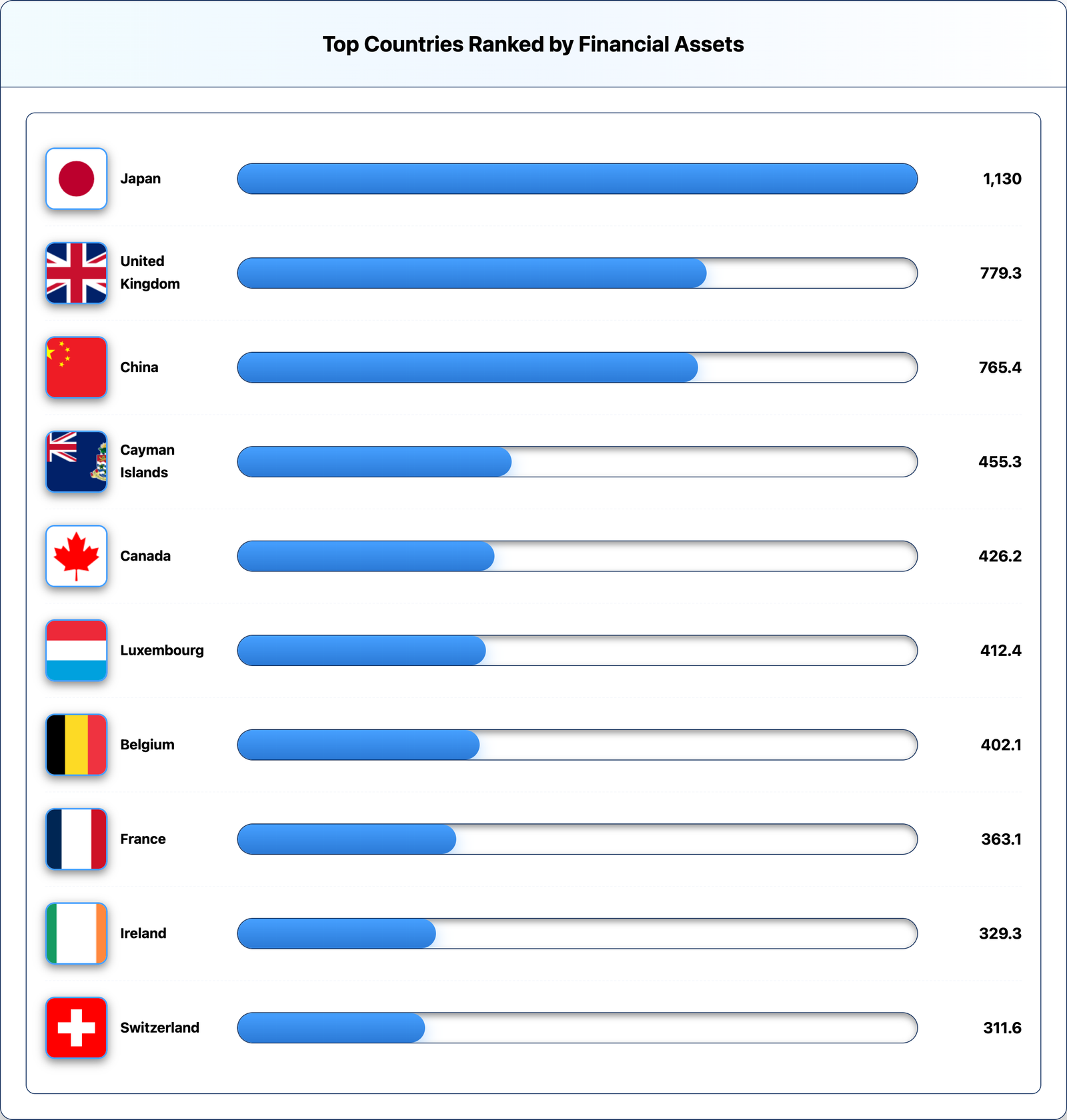
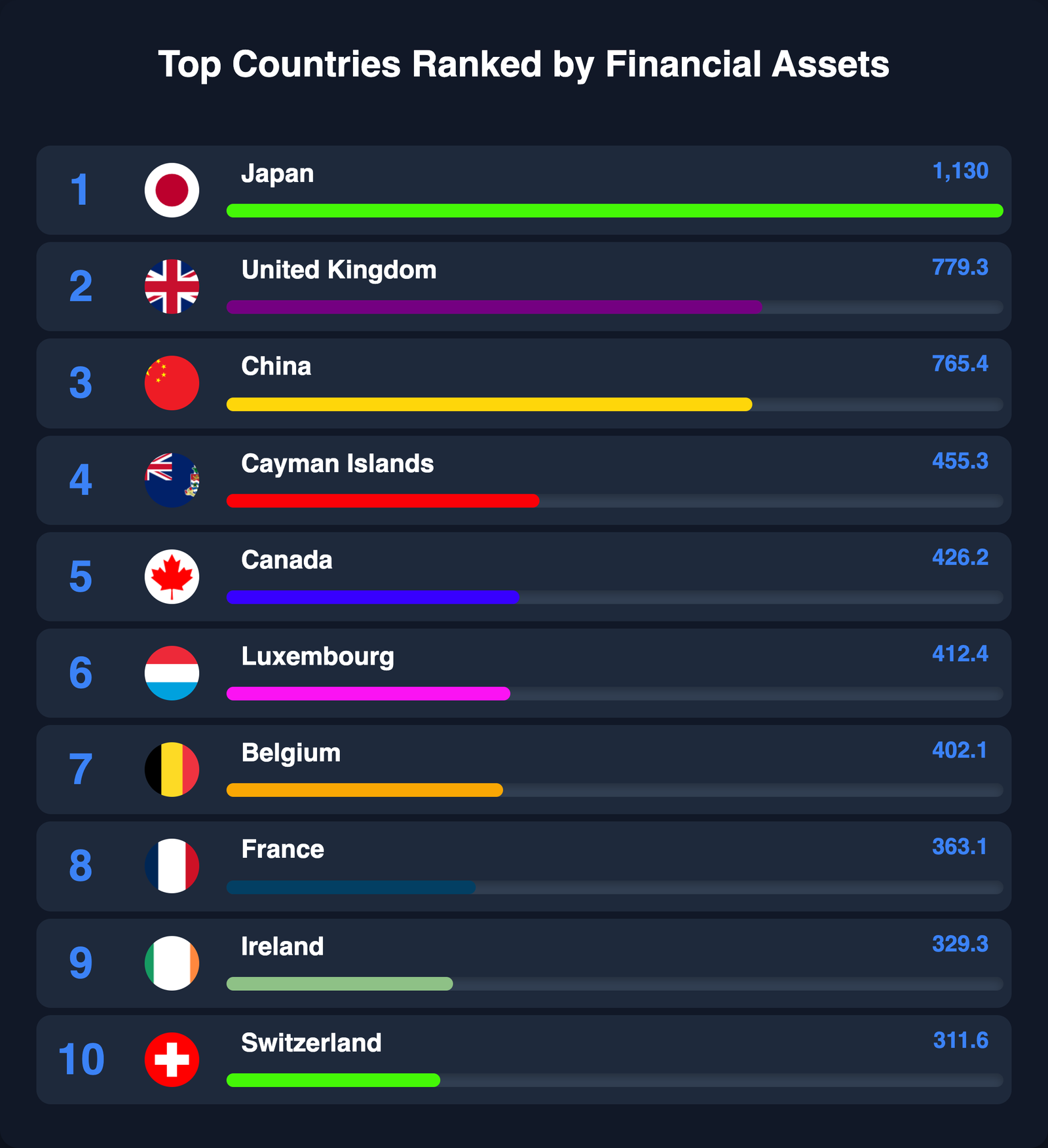
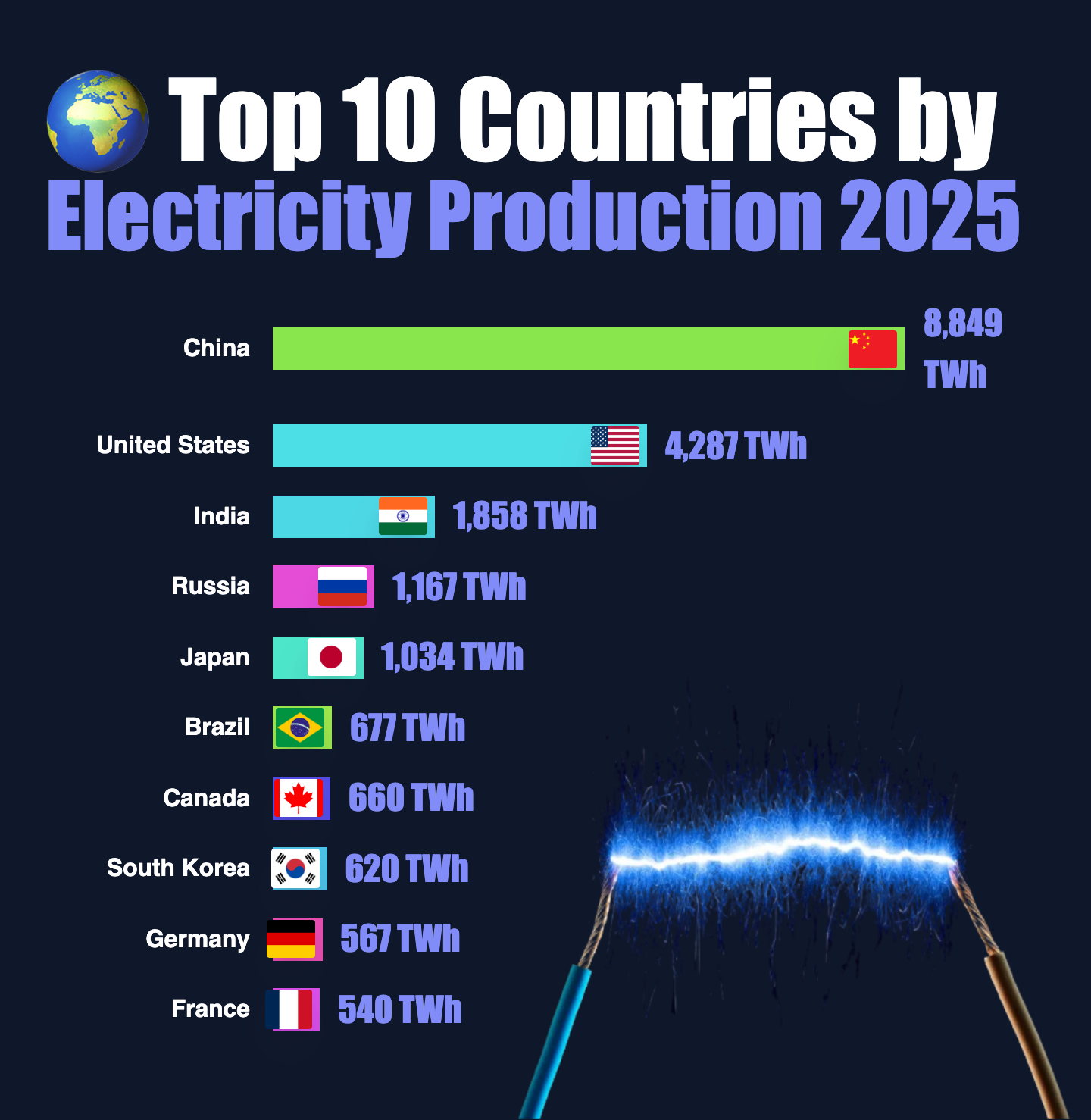
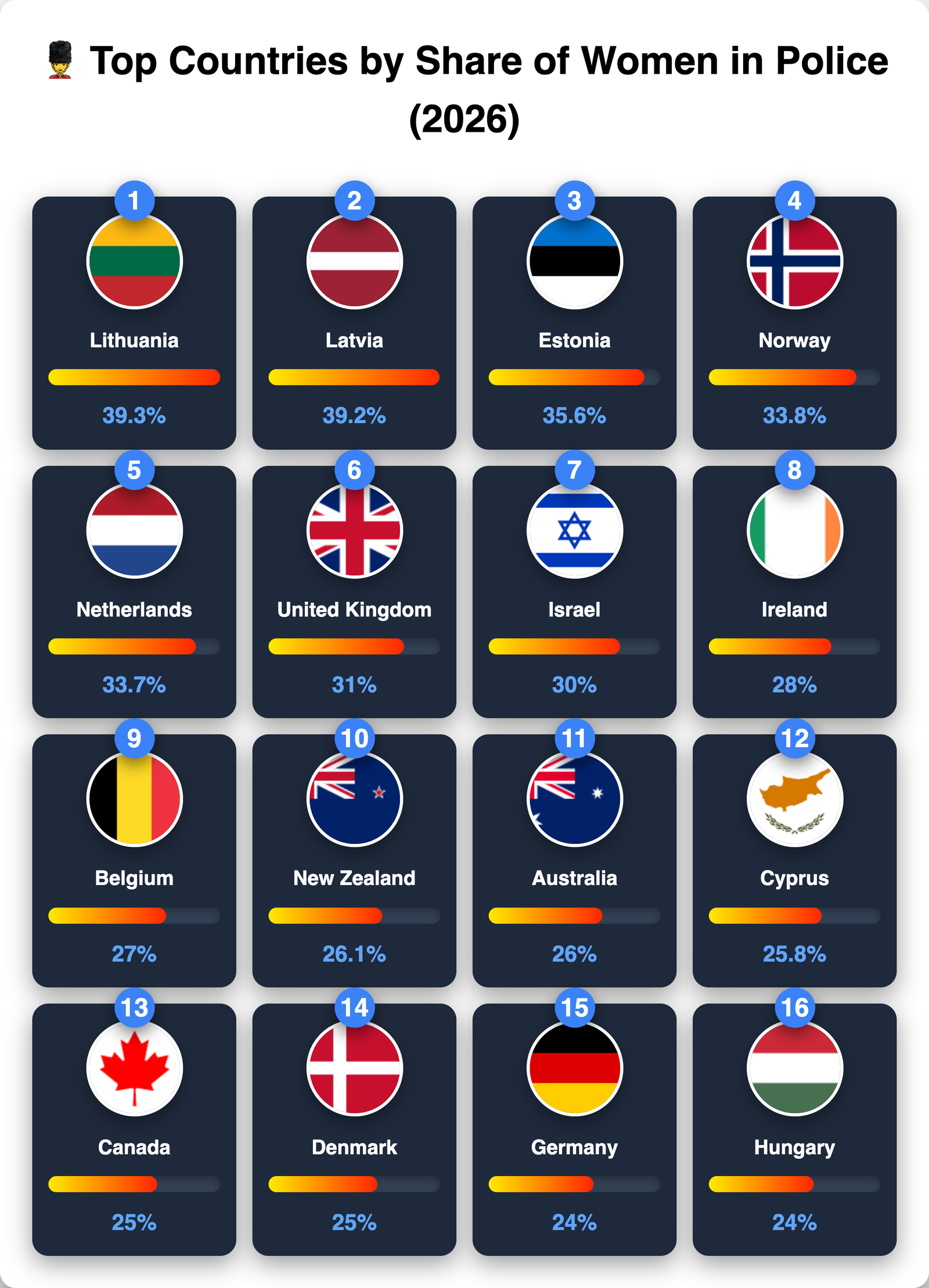
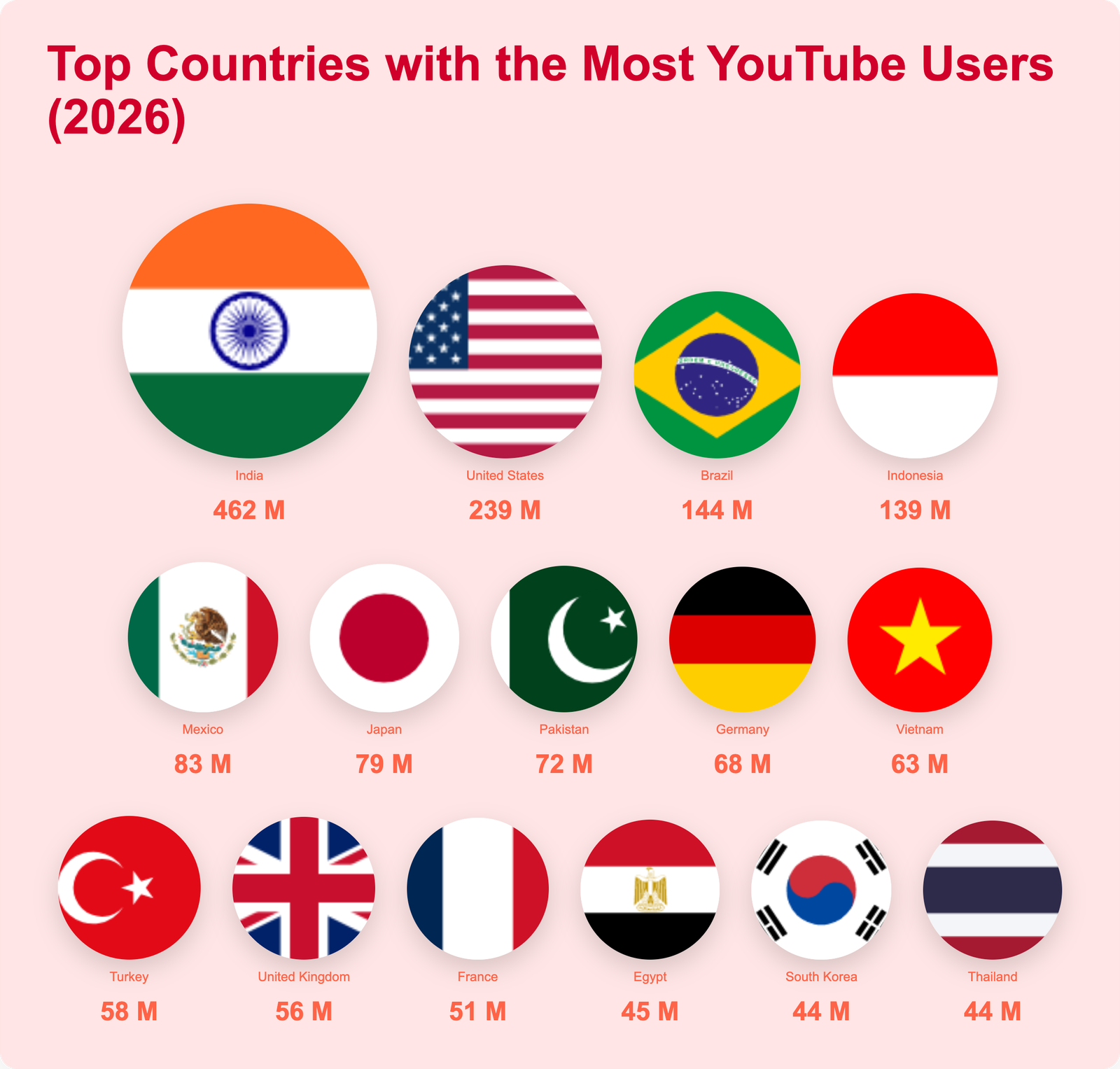
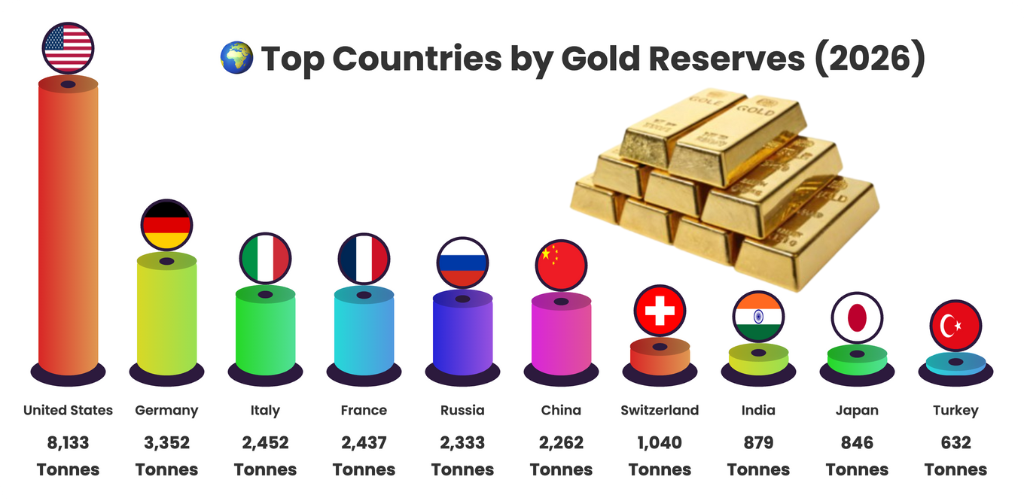
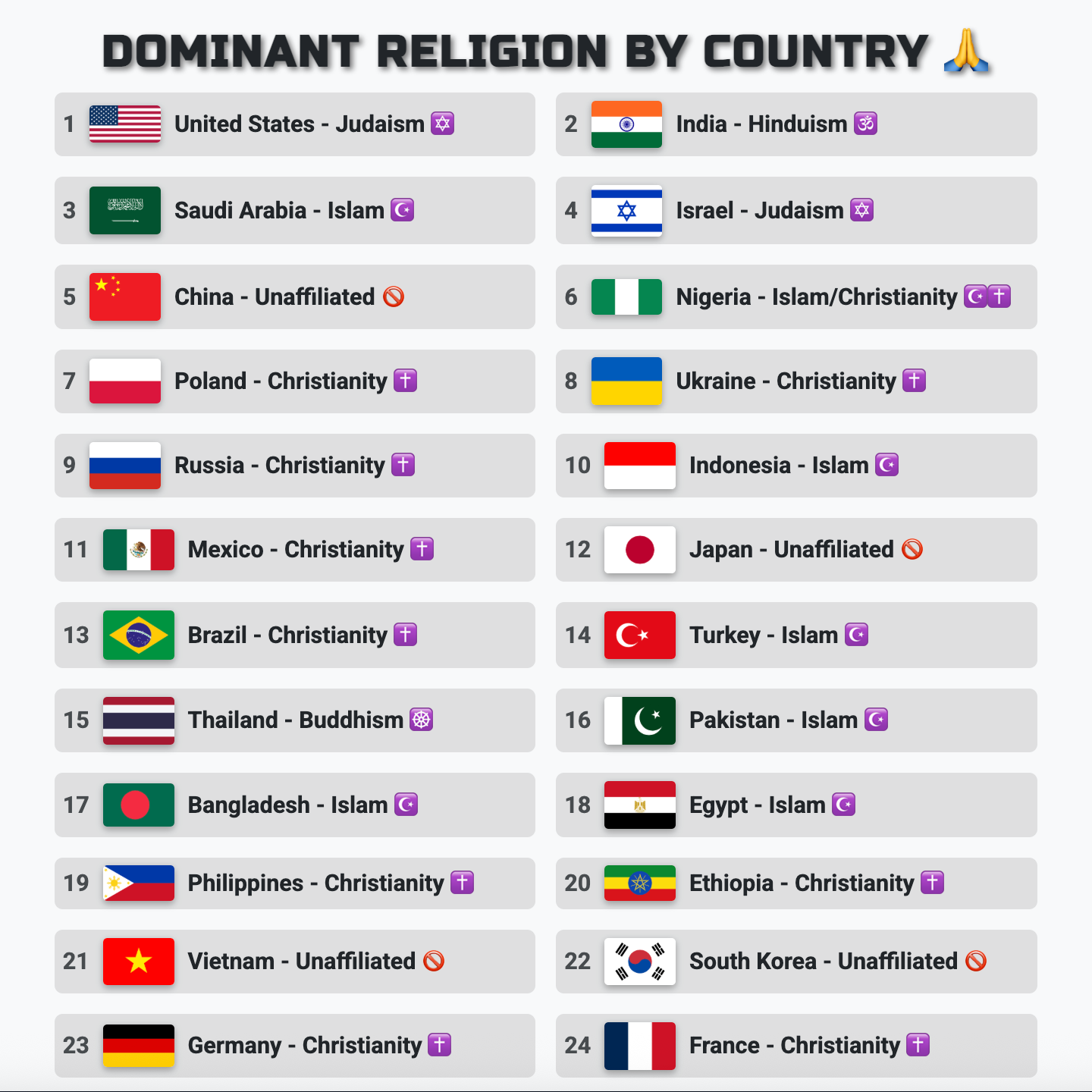
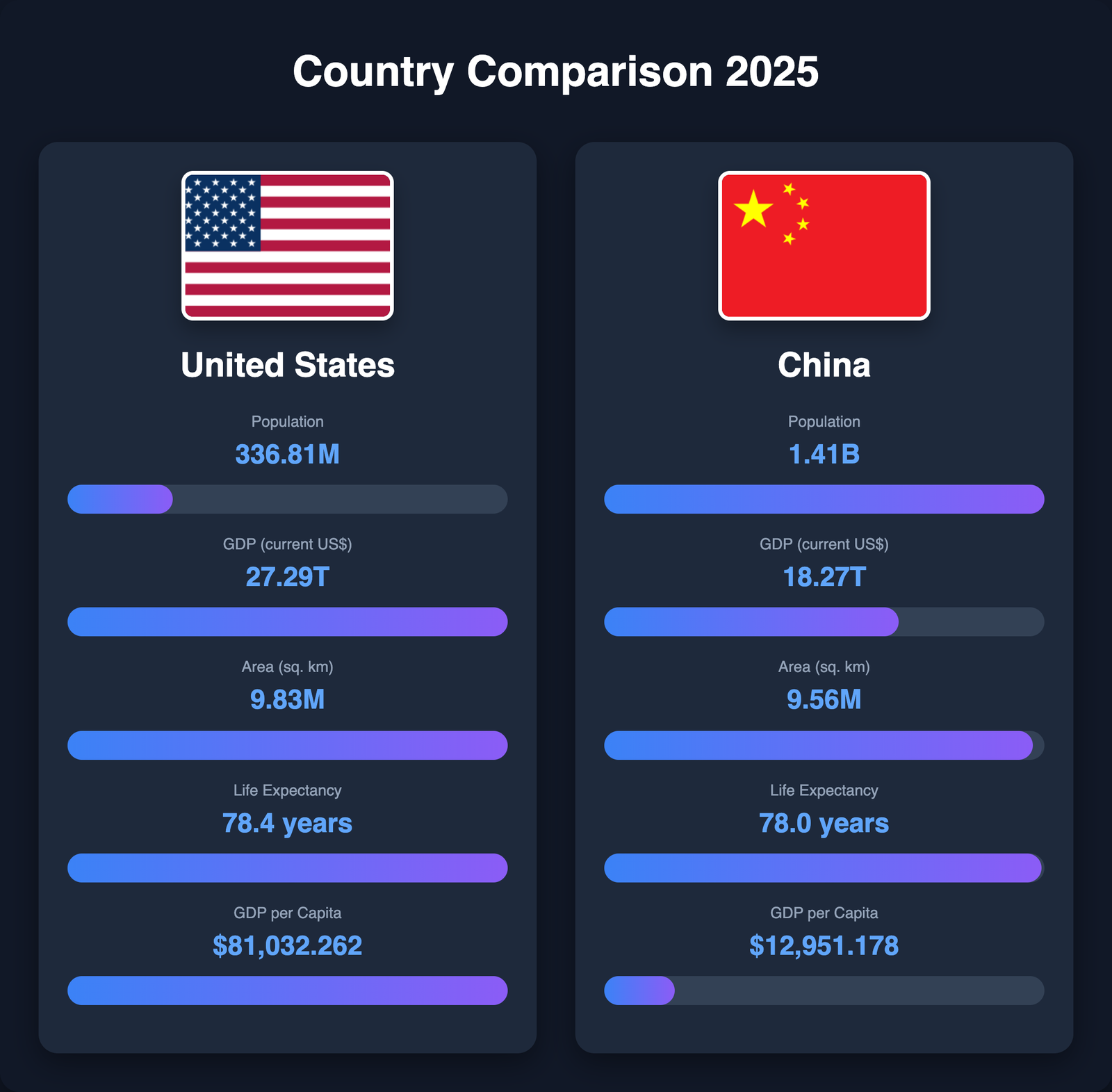
Compare countries with flags, data, and beautiful visualizations. Ideal for geographic analysis, international statistics, and educational content.
What are Infographic and Data Visualization Tools?

Infographic and data visualization tools are powerful online applications designed to transform complex data sets, spreadsheets, and raw information into visually engaging graphics that communicate insights effectively. These digital platforms democratize design by enabling anyoneโ€”regardless of technical expertise or graphic design backgroundโ€”to create professional-quality visual content including bar charts, pie graphs, comparison infographics, ranking lists, country comparisons, and custom data visualizations.

In today's information-saturated digital landscape, visual content outperforms text-only content by significant margins. Research consistently shows that infographics generate 3 times more engagement on social media platforms compared to text posts, while 65% of people retain information better when presented visually versus just 10% retention for verbal information. This fundamental human preference for visual learning makes infographic tools essential for effective communication across education, marketing, journalism, business intelligence, and public information sectors.

NovaBuildr's collection of 12+ specialized infographic tools covers diverse use cases from simple CSV-to-chart conversion to complex multi-country comparisons with national flags, military capability analysis, and 3D ranking visualizations. Each tool is purpose-built for specific data types and presentation needs, ensuring optimal results whether you're creating content for Instagram posts, PowerPoint presentations, research reports, news articles, educational materials, or business dashboards.

Unlike traditional graphic design software like Adobe Illustrator, Photoshop, or Canva that require steep learning curves, subscription fees, and substantial time investment, our browser-based tools provide instant results through intuitive interfaces. Simply input your data in supported formats (typically CSV or manual entry), customize colors, fonts, layouts, and styling options using visual controls, preview your creation in real-time, and export high-resolution PNG images ready for immediate use across digital and print media.

Why Use Infographic and Data Visualization Tools?

The strategic advantages of using dedicated infographic tools extend far beyond simple aesthetics. These platforms deliver measurable business value, educational impact, and communication effectiveness across multiple dimensions.

Dramatic Time and Cost Savings

Professional graphic designers typically charge between $50-$150 per hour for custom infographic creation, with complex projects requiring 3-8 hours of work. A single custom infographic can cost $200-$1,200 depending on complexity and designer expertise. Our free tools eliminate these costs entirely while reducing production time from hours to mere minutes. Create unlimited infographics without budget constraints, enabling rapid iteration, A/B testing, and content volume scaling that would be financially prohibitive with traditional design services.

Enhanced Audience Engagement and Reach

Visual content generates 94% more total views than text-based content across digital platforms. Social media posts containing infographics receive 3 times more likes, shares, and comments compared to text-only updates. This engagement multiplier translates directly to increased brand awareness, website traffic, lead generation, and conversion rates for businesses. Educators benefit from improved student attention spans and knowledge retention, while journalists see higher article readership and social amplification when incorporating data visualizations.

Improved Information Comprehension and Retention

The human brain processes visual information 60,000 times faster than text. Complex data relationships, statistical comparisons, geographic patterns, and trend analysis become immediately apparent through well-designed visualizations that would require paragraphs of explanation in text format. Studies demonstrate that people remember 80% of what they see and do, compared to just 20% of what they read and 10% of what they hear. By presenting information visually, you dramatically improve audience comprehension, decision-making speed, and long-term retention.

Professional Results Without Technical Barriers

Traditional data visualization requires proficiency in specialized software (Adobe Creative Suite, Tableau, Power BI), statistical analysis skills, design principles knowledge, and significant time investment in learning these complex platforms. Our tools remove these barriers through pre-configured templates, automatic layout algorithms, intuitive drag-and-drop interfaces, and real-time preview capabilities. Marketing professionals, teachers, students, small business owners, bloggers, and non-profit organizations gain access to professional-grade visualization capabilities previously available only to large enterprises with dedicated design teams.

Popular Use Cases for Infographic Tools

Business Intelligence and Corporate Reporting

Business analysts and corporate strategists utilize infographic tools to visualize quarterly performance metrics, sales pipeline data, market share comparisons, competitive analysis, customer segmentation, revenue trends, and KPI dashboards. Transform Excel spreadsheets into boardroom-ready presentations that communicate complex business insights at a glance. Create compelling investor presentations, annual reports, strategic planning documents, and client-facing deliverables that enhance credibility and facilitate data-driven decision making.

Education and Academic Research

Educators from elementary schools through universities leverage visualization tools to create engaging teaching materials, illustrate scientific concepts, present historical timelines, display statistical research findings, and develop interactive learning resources. Students use these tools for project presentations, research papers, thesis visualizations, and assignment submissions. The visual approach improves comprehension across diverse learning styles, makes abstract concepts concrete, and increases student engagement with academic content.

Digital Marketing and Social Media Content

Content marketers create shareable infographics for Instagram, LinkedIn, Twitter, Facebook, and Pinterest that drive viral engagement and organic reach. Blog posts incorporating custom infographics receive 72% more views and 3 times more backlinks from other websites, improving SEO performance. Email marketing campaigns featuring visual data see 43% higher click-through rates. Marketing teams produce industry statistics roundups, product comparison charts, feature benefit visualizations, customer success stories, and thought leadership content that positions brands as authoritative industry voices.

Journalism and News Media

Journalists and news organizations employ data visualization to explain complex news stories, illustrate election results, display economic indicators, show geographic patterns of events, track pandemic statistics, compare international policies, and present investigative journalism findings. Visual explanations help readers understand multifaceted issues quickly, improve news article shareability across social platforms, and enhance the credibility of reporting through transparent data presentation.

Government and Public Information

Government agencies, NGOs, and public health organizations create infographics to communicate policy changes, present census data, display public health statistics, show budget allocations, illustrate infrastructure projects, and educate citizens on complex regulations. Clear visual communication increases public understanding of government initiatives, improves compliance with new policies, and enhances transparency in public administration.

Powerful Features Across All Tools

๐ŸŽจ

Full Customization

Control colors, fonts, sizes, layouts, spacing, and styling. Pre-built themes for quick starts.

โšก

Real-Time Preview

See changes instantly as you edit. No waiting, no rendering delaysโ€”WYSIWYG interface.

๐Ÿ“ฅ

High-Res Export

Download PNG images with 2x scaling for crisp quality on any device or print material.

๐Ÿ“ฑ

Multi-Platform

Optimized aspect ratios for Instagram, YouTube, presentations, stories, and more.

๐ŸŒ

200+ Flags

Access every country flag for geographic comparisons and international data.

๐ŸŽฏ

Purpose-Built

Each tool optimized for specific data types and visualization needs.

Frequently Asked Questions

What are infographic and data visualization tools?

Infographic and data visualization tools are online applications that transform raw data into visually appealing graphics, charts, and images. These tools help you create professional bar charts, comparison graphics, ranking infographics, country comparisons, and custom visual content without design skills or expensive software.

How do I create an infographic from CSV data?

Simply upload or paste your CSV data into any of our CSV-to-image tools, customize the design with colors, fonts, and layouts, preview your infographic in real-time, and export it as a high-quality PNG image. Our tools support various formats including bar charts, grid layouts, country comparisons, and ranking graphics.

Are these infographic tools free to use?

Yes, all NovaBuildr infographic and data visualization tools are completely free with no hidden costs, watermarks, or subscription fees. You can create unlimited graphics, customize designs, and export as many times as needed without registration or payment.

What file formats can I export from these tools?

Most tools export infographics as high-resolution PNG image files with 2x scaling for professional quality. PNG format is perfect for social media, presentations, websites, reports, and printed materials while maintaining transparency and crisp details.

Can I create country comparison infographics?

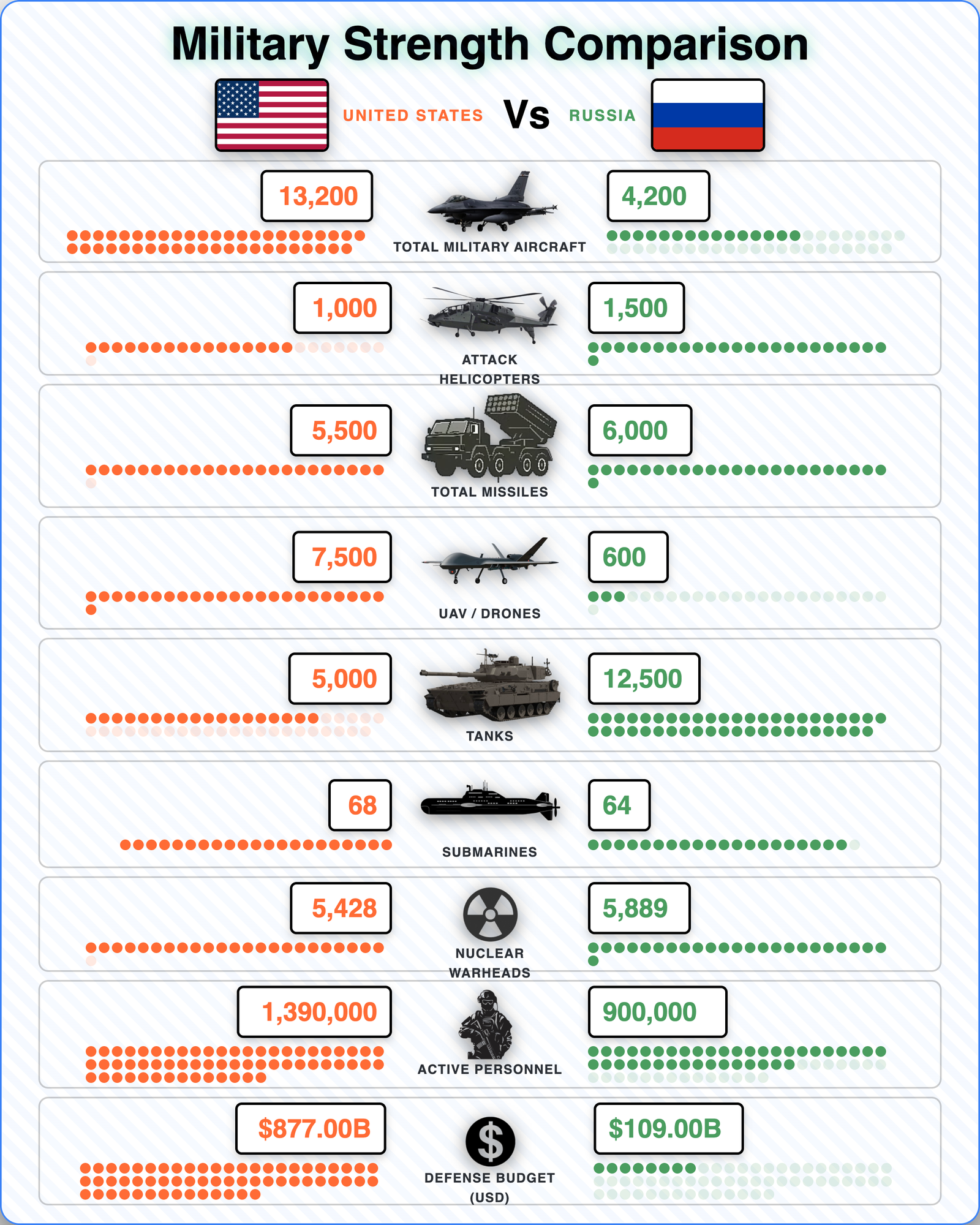
Yes! We offer multiple country comparison tools including general country comparisons, military power comparisons, and ranking infographics. These tools feature national flags, customizable layouts, and professional styling to create engaging geographic visualizations.

What types of charts and graphs can I create?

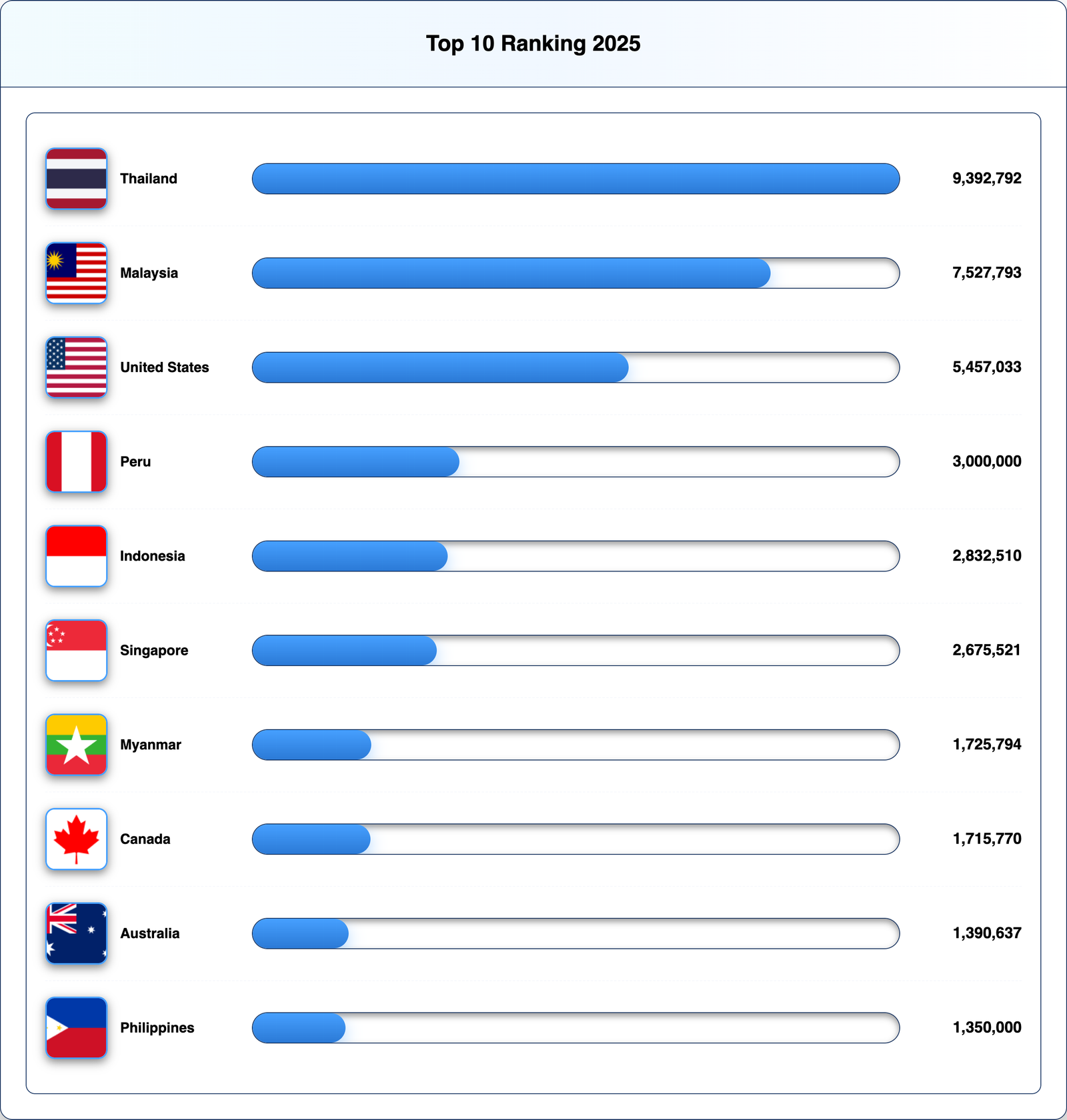
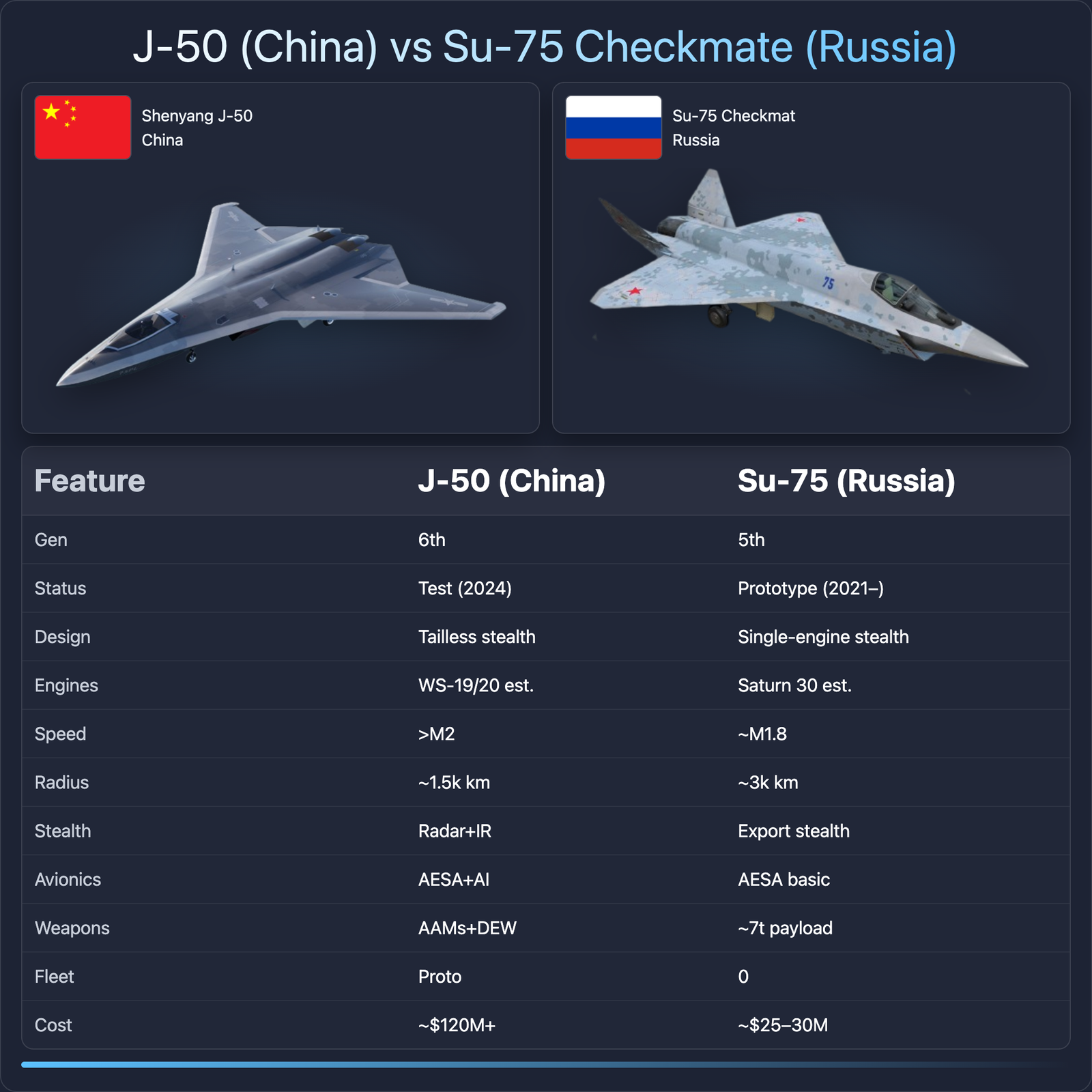
You can create various visualization types including vertical bar charts, horizontal bar charts, 3D comparison bars, grid data layouts, ranking infographics, country comparisons, military comparisons, fighter jet comparisons, and custom data infographics. Each tool is optimized for specific data types and use cases.

Do I need design skills to use these tools?

No design skills required! All tools feature intuitive interfaces with pre-built themes, automatic layouts, and easy customization options. Simply input your data, choose a style, and export. Real-time preview ensures you see exactly what you're creating before downloading.

Can I customize colors, fonts, and layouts?

Absolutely! Every tool offers extensive customization including custom color schemes, multiple font families, adjustable sizes, background options (gradients, solid colors, images), spacing controls, and layout variations. Pre-built themes provide quick starting points for professional results.

Ready to Create Stunning Visual Content?

Join thousands of creators, educators, marketers, and businesses using our free tools to transform data into engaging infographics in minutes.

Explore All Tools - Free Forever!

Explore More NovaBuildr Tools